Boolean and Synonym Searching Across PDF Documents
Search one common word across a document set and you get four hundred hits, which is the same as none. Search an exact sentence and you get zero, because nobody wrote it quite that way. The useful search is almost always between those two, and getting there needs more than one box.
Three tools do most of the work: combining terms, loosening spelling, and widening vocabulary. They solve different problems and are frequently used for the wrong one.
AND and OR, and which problem each solves
| AND | OR | |
|---|---|---|
| Requires | Both phrases present | Either phrase present |
| Effect | Fewer, more relevant results | More results, wider coverage |
| Use when | A single term returns too much to review | The same idea might be written either of two ways |
| Typical case | A common surname plus a company name | "invoice" or "statement"; a company and its former name |
| Failure mode | Excludes documents discussing the matter in only one term | Returns so much that reviewing it all is impossible |
The practical rule: reach for AND when you are drowning, OR when you suspect you are missing things. Most searches need both at different stages, and the order matters — start wide with OR to see the shape of the set, then narrow with AND once you know what you are looking at.
Where synonym expansion fits
Fuzzy matching handles a word spelled differently. Synonym expansion handles a different word for the same idea, and the distinction matters because people reach for the wrong one. No amount of fuzziness connects "terminate" to "cancel" — they are not close spellings, they are different words.
PFinder supports both, plus two phrases combined with AND or OR, across a whole set of loaded PDFs, with results exportable as an HTML report. It is free on Windows.
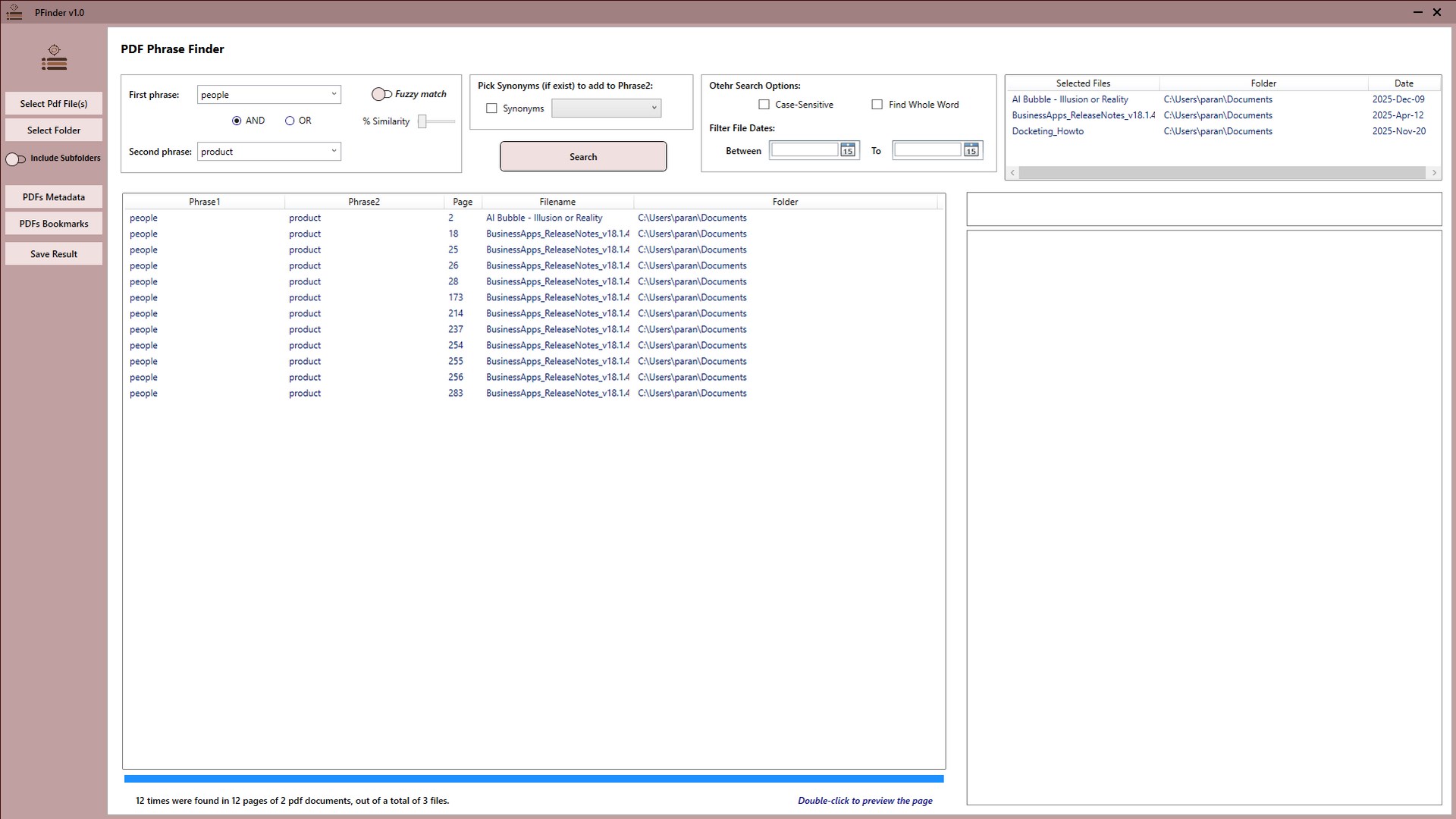
A search sequence that works
Rather than guessing at the right query, run a short sequence that tells you about the document set as you go.
-
Start with one distinctive term and see the scale
Run the single most specific term you have and look at how many results come back. That number tells you whether the next move is to narrow or to widen.
-
If there is too much, add a second term with AND
Combine your term with something distinctive that must also be present — a company, a place, a reference. This is the fastest way to turn an unreviewable result list into a workable one.
-
If there is too little, widen with OR
Search the term alongside a plausible alternative. Two names for one company, or two words for one idea, are the usual cases.
-
Read a few results to learn the set's vocabulary
The main value of an early wide search is discovering what the authors called things. The term the documents use is often not the one you started with.
-
Use fuzzy for spelling, synonyms for wording
These solve different problems. Fuzzy matching finds a word spelled differently; synonym expansion finds a different word for the same idea. No amount of fuzziness connects 'terminate' to 'cancel'.
-
Export the results once the query is right
Export the HTML report so the search and its findings are recorded, and so you do not have to reconstruct the query later.
Let the documents teach you their vocabulary. The most valuable output of an early wide search is not the hits — it is discovering what the authors actually called things. Read a few results properly and you will find the term the set uses, which is usually not the one you started with. Then search that.
Matching the technique to the failure
| Problem | Use |
|---|---|
| Far too many results | AND with a second distinctive term |
| No results, term definitely present | Shorten the phrase, then fuzzy matching |
| Right idea, wrong word | Synonym expansion, or OR with the alternative |
| Name spelled inconsistently | Fuzzy matching on a short stable fragment |
| Two names for one company | OR between both names |
| Nothing works at all | Check the document is not a scan without a text layer |
Name variation is a large enough problem on its own to be worth its own treatment — finding a name when the spelling keeps changing.
Get PFinder
Two phrases, AND or OR, fuzzy matching and synonym expansion across your documents. Free.
Get PFinder free on the Microsoft StoreFree · no account, no sign-up · Windows 10 & 11
Frequently asked questions
How do I search PDFs for two terms at the same time?
Use a Boolean operator between them. PFinder searches two phrases across a whole set of loaded PDFs, combined with AND — both must be present — or OR, either will do. AND narrows an unreviewable result list; OR widens coverage when the same idea might be written two ways.
When should I use AND rather than OR in a document search?
Use AND when a single term returns too much to review, adding a second distinctive term that must also appear. Use OR when you suspect you are missing documents because the same thing is described in different words. Most reviews need both: OR early to see the shape of the set, AND later to focus.
What is the difference between fuzzy matching and synonym expansion?
Fuzzy matching finds words spelled differently from your query, measured by single-character edits — it catches typos, OCR errors and transliteration variants. Synonym expansion finds different words for the same idea. They are not interchangeable: no amount of fuzziness connects 'terminate' to 'cancel', because those are different words rather than different spellings.
Why does my exact phrase search return nothing?
Because exact search fails on a single differing character, and long phrases give it many chances to differ. Shorten the phrase to its most distinctive two or three words, then enable fuzzy matching. If it still returns nothing, check whether the document is a scan with no text layer, which cannot be searched at all.
How do I find the right search terms for a document set?
Run a wide search first and read a few results properly. The most valuable thing an early search produces is not its hits but the discovery of what the authors actually called things — which is usually not the wording you started with. Then search the set's own vocabulary.
Can I export the results of a PDF search?
Yes. PFinder exports search results as an HTML report, which can be shared or kept as a record of what was searched and what came back. That record matters in review work, where being able to show which terms were run — including those that found nothing — is part of demonstrating the search was adequate.