Time Tracking Without a Subscription: What a One-Time Purchase Actually Gets You
Searching for a time tracker in 2026 turns up roughly the same product forty times: a web app, a free tier that expires, and a price quoted per user per month. For a team that model is reasonable. For one person billing four clients it is a standing charge against a task that takes minutes a week.
This page is not an argument that subscriptions are a scam. They fund continuous development, hosting and support, and for collaborative software they are the only sane model. It is an argument that the software category "solo time tracking" has been priced as though it were collaborative software, and that a lot of freelancers are paying rent on a feature set they use about four per cent of.
Why time tracking became a rental
Three forces pushed the whole category to subscriptions, none of which have much to do with what a solo professional needs:
- Team seats are the business model. Trackers are sold to managers who want visibility across staff. Pricing is per seat because the buyer has many seats — the solo user is an afterthought on the bottom pricing tier.
- Sync requires servers. Once your data lives in the vendor’s cloud, someone has to pay for that cloud every month, forever. The recurring cost is real; it is just a cost created by an architecture you may not need.
- Recurring revenue is worth more. A subscription business is valued at a multiple of its recurring revenue, so there is strong commercial pressure to convert one-time products into rented ones regardless of whether the product benefits.
The practical consequence for a one-person business: you are billed monthly for multi-user infrastructure, in perpetuity, to solve a single-user problem that runs entirely on your own PC.
The arithmetic over a realistic horizon
Software costs are easy to underestimate because they arrive in small monthly pieces. Set against a one-time purchase of $10.49, a typical stack looks like this. Adjust the monthly figures to whatever you are actually quoted — the shape does not change.
| Horizon | Tracker at $9/mo | Tracker + invoicing at $20/mo | Taskool, bought once |
|---|---|---|---|
| Year 1 | $108 | $240 | $10.49 |
| Year 3 | $324 | $720 | $10.49 |
| Year 5 | $540 | $1,200 | $10.49 |
Two details make the middle column the honest comparison rather than the left one. First, most trackers do not invoice — billing is a second subscription, which is why the realistic figure is a stack rather than a single line. Second, subscription prices rise; the multi-year totals above assume they do not, which makes them conservative.
What you give up by owning instead of renting
An honest comparison has to run in both directions. A locally installed, bought-once tracker genuinely cannot do some things, and if you need them you should pay the subscription:
| You need… | Rent or own? |
|---|---|
| Several people’s time in one dashboard | Rent. Team visibility needs a server; that is what you are paying for. |
| The same timer on laptop, phone and desktop | Rent. Cross-device sync is inherently a hosted service. |
| Automatic sync into Xero, QuickBooks or a PM tool | Rent, unless exporting Excel or PDF and importing is acceptable — for most solo workflows it is. |
| One person, one Windows PC, invoices to a handful of clients | Own. Every recurring cost above is buying infrastructure this case does not use. |
| Work under NDA, or on a client machine that forbids cloud tools | Own. Here local-only storage is not a saving, it is a requirement. |
That last row is worth dwelling on. For contractors in legal, medical, defence and finance work, an activity log leaving the machine is a compliance problem, not a preference — and it rules out most of the category before price is even discussed.
What "one-time purchase" has to include to be worth it
Buying once is only a saving if the product is complete. A cheap tracker that cannot invoice just moves the subscription one step down the workflow. Use this as the checklist:
-
Total your current stack over three years
Add every recurring tool the billing workflow touches — the tracker, the invoicing app, any add-on — and multiply by thirty-six. This is the number a one-time purchase is competing against, not the monthly figure.
-
Decide whether you genuinely need sync
Sync is the honest reason most trackers are hosted. If you track on one Windows PC and only ever invoice from it, you are paying monthly for infrastructure you do not use.
-
Check that invoicing is included, not an add-on
A tracker without billing means a second subscription downstream. Confirm the one-time price covers turning hours into a sendable document, or the saving is illusory.
-
Confirm export formats before buying
Without an API, export is your integration. PDF for clients, Excel for your accountant, Word for editing — if all three are present, the absence of direct accounting-software sync rarely matters.
-
Establish where the activity log is stored
Ask specifically whether the log leaves the machine. For NDA and client-machine work this decides the question on its own, ahead of price.
-
Buy once and reassess in a year
A one-time purchase caps the downside at the purchase price. If the workflow outgrows it — you hire, or you need shared dashboards — you move to a subscription then, having spent a fraction of what three years of renting would have cost.
Watch for the fake one-time purchase. Some apps sell a licence and then gate the useful half — export, invoicing, or anything beyond a handful of projects — behind an add-on that is, functionally, a subscription. If invoicing and export are not in the base price, the price is not the price.
Where Taskool sits
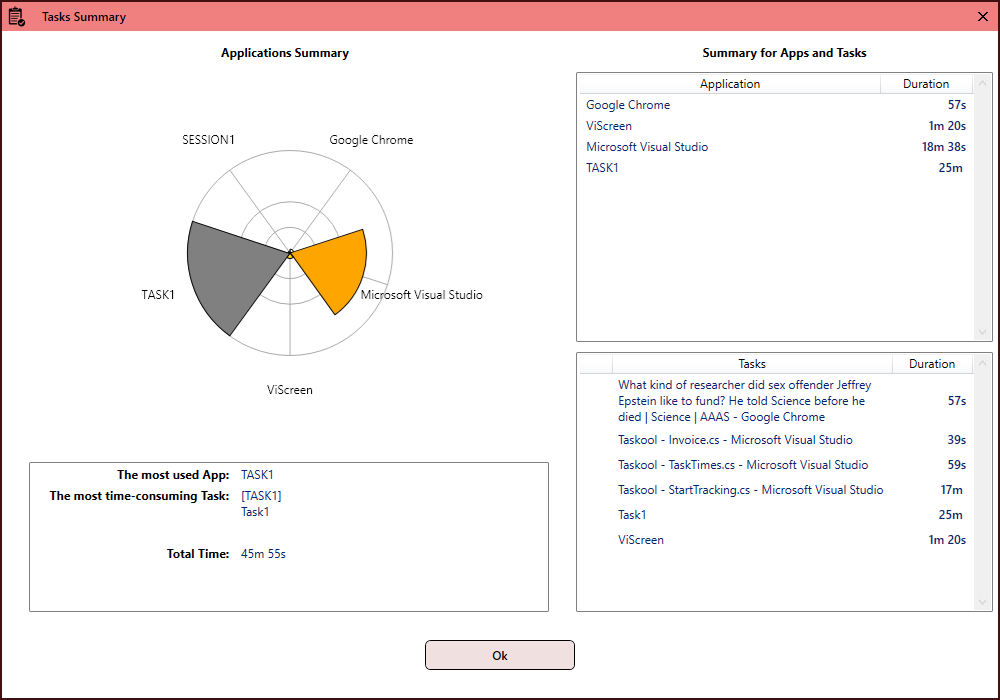
Taskool is a Windows desktop app sold once on the Microsoft Store for $10.49, with no account, no seat fee and no recurring charge. It tracks active-window sessions passively with a 15-second threshold that discards brief distractions, organises them into client projects with per-project and per-application hourly rates, and generates the invoice itself, exporting to PDF, Word or Excel. The data lives in a local database on the PC and is never uploaded.
It runs on Windows 10 (build 17763 or later) and Windows 11, needs .NET 8.0, and sits in the system tray. It does not sync across devices and it does not show you a team’s hours — which is the trade being made, stated plainly.
If the workflow itself is what you are evaluating rather than the pricing model, start with how automatic tracking turns into an invoice, or with setting different rates per client.
Get Taskool
Automatic time tracking and invoicing for Windows. Bought once, stored on your own PC.
View on the Microsoft Store$10.49 USD · one-time purchase · Windows 10 & 11
Frequently asked questions
Is there a time tracker with no monthly subscription?
Yes, though they are now a minority. Taskool is a Windows desktop time tracker sold once on the Microsoft Store for $10.49, with no account, no per-seat fee and no recurring charge. It tracks active-window time automatically and generates invoices from the tracked hours, both included in the purchase price.
Why is almost all time tracking software subscription-based?
Because the category is sold primarily to teams, where per-seat monthly pricing matches the buyer, and because cloud sync requires servers that cost money every month. Both reasons are legitimate for multi-user, multi-device products — they just do not apply to one person tracking work on one PC.
Is a one-time purchase cheaper than a subscription in the long run?
For a solo user, usually by a wide margin. A tracker at $9 a month is $324 over three years, and since most trackers do not invoice, the realistic stack including a billing tool runs considerably higher. A one-time purchase caps the cost at the purchase price regardless of horizon. The calculation flips if you need team dashboards or cross-device sync, which a local app cannot provide.
What do you lose with offline, locally installed time tracking?
Three things, mainly: cross-device sync, shared team visibility, and automatic integration with accounting or project-management services. If those matter, a subscription is the right purchase. If you work alone on one Windows PC and export to PDF or Excel for your accountant, none of them are in use.
Do I still get updates with a one-time purchase from the Microsoft Store?
App updates are delivered through the Microsoft Store like any other Store app, and the licence is tied to your Microsoft account rather than to an active payment. The distinction from a subscription is that the software keeps working if you stop paying — because there is nothing to stop paying.
Is a cheap one-time time tracker worth it, or is it limited?
The question to ask is whether the base price is complete. Some one-time apps gate export or invoicing behind an add-on, which reintroduces the recurring cost. Taskool includes automatic tracking, per-project and per-application rates, manual and stopwatch entry, invoice generation and PDF, Word and Excel export in the one purchase.
Can I use time tracking software that does not upload my data?
Yes, and for some work it is mandatory rather than preferable — contractors under NDA, or on client machines whose security policy forbids third-party monitoring services, cannot use a cloud tracker at all. Taskool stores its activity log in a local database on the PC with no account and no sync, so nothing leaves the device.