You Forgot to Log Your Hours. Here’s How to Reconstruct the Week Accurately
It is Friday, the invoice is due, and the timesheet has a hole in it roughly the size of Tuesday and Wednesday. You know you worked. You cannot prove how much, and the number you eventually write down will be a guess that favours the client.
Everyone in professional services has done this. The instinct is to sit down with a calendar and reconstruct the week from memory, but memory is a poor witness for billing: research on retrospective timekeeping consistently finds that people under-report, not over-report, because the small fragments go first — the twenty-minute revision, the email that turned into analysis, the call you took while walking.
The good news is that your computer kept a record whether or not you asked it to. This guide covers two things: how to squeeze a defensible timesheet out of the traces you already have, and how to make the reconstruction unnecessary next week.
The forensic pass: where the evidence actually lives
Before opening any tool, harvest what already exists. Each of these is a timestamped record of you doing something:
- File modified-dates. Sort your working folders by "Date modified" and set the range to the week. Every save is a timestamp you were at the keyboard.
- Sent mail. Your sent folder is a chronological log of decisions, ordered precisely.
- Version control and ticket history. Commits, comments and status changes carry exact times.
- Calendar. Meetings that happened, and the gaps between them that were work.
- Browser history. Documentation and research sessions, with times.
This gets you an outline — a scatter of points proving you were working at 09:14 and again at 11:40. What it cannot give you is duration. You know when things happened; you still have to guess how long each took, and that guess is where the billing error lives. Bridging that gap is the whole job.
Turning fragments into billable durations
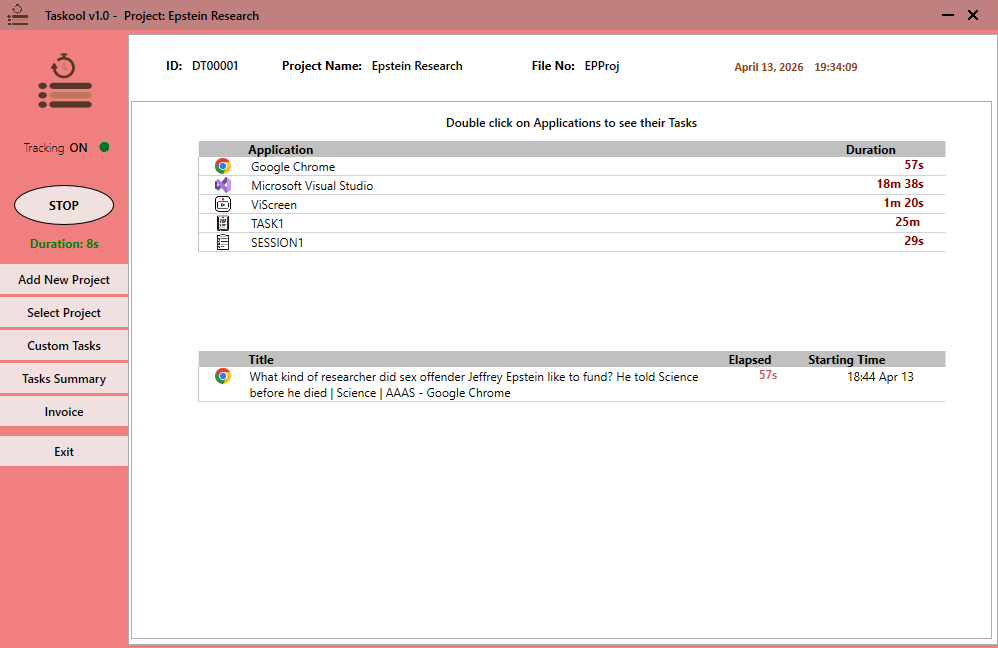
An active-window log solves the duration problem directly, because it records not just that a file was touched but how long the window holding it stayed in front. If Taskool was running during the week in question, the reconstruction is mechanical rather than archaeological. Here is the process either way.
-
Fix the boundaries of each working day
Find your first and last piece of evidence for each day — earliest file save or sent email, latest commit or message. That brackets the day and stops you billing outside hours you actually worked.
-
Lay the timestamps out in order
Merge file saves, sent mail, commits and calendar entries into one chronological list per day. Clusters of activity are work sessions; long empty gaps are lunch, travel or genuine breaks.
-
Assign durations from the activity log
Open the day in Taskool’s activity view. Because it records how long each application and document held focus, the duration of each session is read off rather than estimated — this is the step that converts guesswork into a record.
-
Add the offline blocks manually
Client calls, meetings and site visits leave no screen trace. Add them with the manual entry form against the calendar entry that proves they happened.
-
Sort sessions into clients and mark non-billable
Drag each session onto its project. Be deliberate about what is genuinely billable — admin, internal tooling and your own learning usually are not, and separating them now is what makes the invoice survive scrutiny.
-
Generate the invoice from the reconstructed log
Set the rate per project and run the invoice generator. The exported PDF, Word or Excel file is backed by the session record, so any line item can be substantiated on request.
Round honestly, and in the client’s favour at the boundaries. A reconstructed timesheet is a professional judgement, not a measurement — so make the judgement conservative and keep the underlying log. If the entry is ever queried, "here is the session record" ends the conversation in a way that "I remember it being about three hours" does not.
The part that stops it happening again
Reconstruction is a skill worth having and a habit worth losing. The reason the hole appears is structural: manual timers ask you to remember something at the precise moment your attention is elsewhere, which is the moment you are least able to comply. Discipline is not the fix, because the people who most need the fix are the ones doing the deepest work.
Passive tracking removes the requirement. Taskool sits in the Windows system tray and records active-window sessions on its own, applying a 15-second threshold so that glancing at a notification never becomes an invoice line while genuine work always does. You are never reconstructing a week again — you are reviewing one, which takes minutes and produces a number you can defend.
Because the log is continuous across days, a week you forgot about entirely is still there when you go looking. And since everything is stored locally on the PC rather than uploaded to a vendor, the record stays yours — which matters when the work is under NDA.
From reconstructed hours to a sent invoice
Once the week is rebuilt, assign the sessions to the right client or project, set the hourly rate, and generate the invoice from the same app — hours become line items and export to PDF, Word or Excel. The full workflow is covered in the guide to automatic tracking and invoicing.
Get Taskool
Passive time tracking that means never rebuilding a week from memory again.
View on the Microsoft Store$10.49 USD · one-time purchase · Windows 10 & 11
Frequently asked questions
How do I recover billable hours I forgot to track?
Start with the timestamps you already have: file modified-dates in your working folders, your sent mail, commits or ticket updates, and calendar entries. These establish when you worked. To get durations rather than guesses, use an activity log that recorded how long each window held focus — on Windows, Taskool logs this passively, so a forgotten week can be read off rather than reconstructed from memory.
Can Windows tell me what I worked on last week?
Windows itself keeps only partial traces — Recent Files, jump lists and File Explorer’s date-modified column — and none of them record duration. For a complete record of which application and document was in front and for how long, you need a background tracker that was already running, such as Taskool, which stores a continuous multi-day log locally on the PC.
Is it acceptable to bill for reconstructed hours?
It is normal practice in professional services, provided the reconstruction is honest, conservative at the edges, and supported by evidence you can produce if the entry is queried. The risk is not that reconstruction is improper; it is that memory-based estimates are inaccurate in both directions. Keeping the underlying activity log is what makes a reconstructed entry defensible.
Why do I always under-bill when I write my timesheet from memory?
Because the fragments disappear first. Long, memorable blocks of work get recorded; the ten- and twenty-minute pieces scattered through the day do not, and in most professionals’ weeks those fragments add up to several hours. A passive log captures them because it is not relying on you to notice them.
How do I stop forgetting to log hours in future?
Remove the requirement to remember. A passive tracker records active-window sessions without being started, so the end-of-week task changes from reconstructing a timesheet to reviewing one. Taskool does this on Windows with a 15-second threshold that discards brief distractions, so the log stays readable rather than becoming hundreds of fragments.
Does automatic tracking send my activity to the cloud?
Most automatic trackers do, which is a real problem under NDA or on client machines. Taskool is an exception: the log is stored in a local database on the PC and never uploaded, with no account and no sync.