How to Bill Multiple Clients at Different Hourly Rates Without a Spreadsheet
Three clients, three rates. One of them pays a different rate for strategy than for production. And somewhere in there is the admin time you bill at nothing at all. The spreadsheet that holds this together is one mis-dragged formula away from an invoice you will have to apologise for.
Rate complexity is a good sign — it usually means you have enough clients to price them differently and enough leverage to charge more for the work that matters. It is also the single most common source of invoicing errors among independent professionals, for a reason worth stating plainly: the arithmetic is trivial, but the bookkeeping of which minute belongs to which rate is not.
Why the spreadsheet breaks
A rates spreadsheet fails in ways that are quiet rather than dramatic:
| Failure | How it shows up |
|---|---|
| The rate lives in the formula, not the row | A rate rise applies retroactively to work already invoiced, or not at all to new work |
| One client, two rates | Strategy hours get billed at the production rate because they landed in the wrong column |
| Hours entered as decimals from memory | 1:45 becomes 1.45 instead of 1.75 — a 20-minute error per entry, repeated |
| Non-billable time in the same sheet | Admin either gets invoiced by accident or is invisible, so you never learn what it costs you |
| Rounding applied per-row | Dozens of small roundings compound into a total that does not match the sum of the work |
None of these produce an obvious wrong answer. They produce a plausible one, which is worse, because it gets sent.
The structural fix: attach the rate to the work, not the sum
The reliable pattern is to make the rate a property of the project or activity, so that a tracked session is priced the moment it is filed rather than at the end of the month when someone builds a total. Taskool works this way on Windows: rates are set per project, and can also be set per application or activity type, so a session inherits the correct price automatically.
That second option is the one that solves split rates within a single client. If design work happens in one application and administration in another, the two bill differently without you sorting them by hand. Here is how to set it up.
-
Create one project per client
Every client gets its own project — not a shared list with a client column. This is what keeps invoices separable later and stops one client’s hours drifting into another’s total.
-
Set that project’s standard hourly rate
Enter the rate you actually agreed, including currency, at the project level. Every session filed under the project inherits it, so the rate is applied at the moment of filing rather than recalculated at invoice time.
-
Split rates within a client using per-application rates
Where one client pays differently for different work, set a rate on the application or activity itself. Time in the design tool bills at the higher rate; time in the admin tool bills at the lower one, in the same project.
-
Add a zero-rate project for non-billable time
Give admin, business development and your own learning a project at a rate of zero. It stays off invoices while still showing up in the daily summary, so you can see what your overhead actually costs.
-
Let tracking file the hours for you
With Taskool running in the system tray, sessions are recorded automatically and dropped onto projects afterwards — so the rate is applied to measured time rather than to a number typed in from memory.
-
Generate one invoice per project
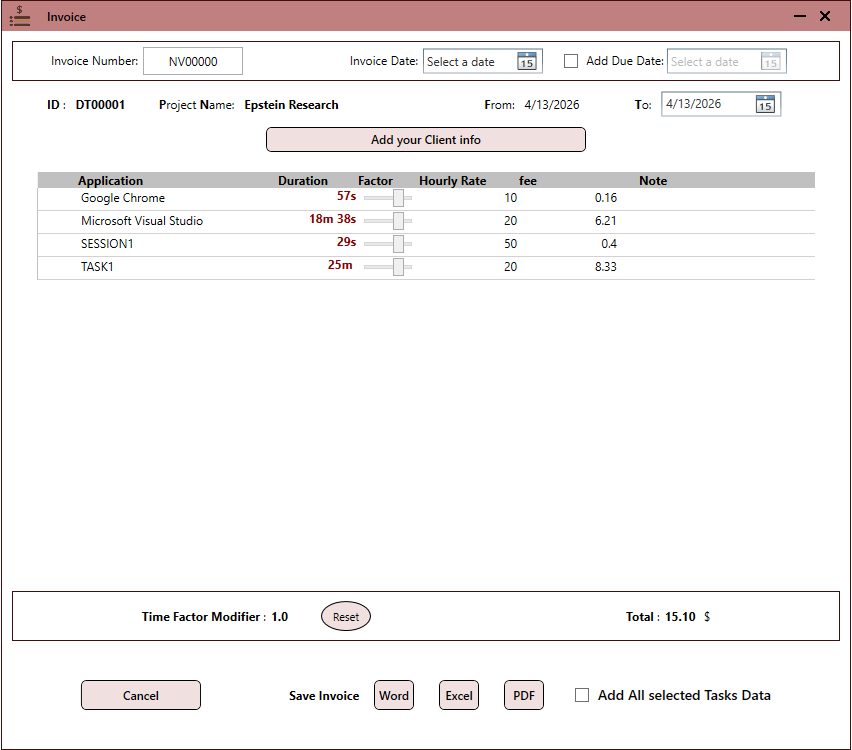
Run the invoice generator per project. Each line carries its own rate and the total is computed from the session record, then exported as PDF, Word or Excel.
Give non-billable work a project too — at a rate of zero. The temptation is to leave admin untracked. Track it at zero instead: it stays off the invoice, and after a month you can see exactly how many hours a client’s unbilled overhead is consuming. That number is the single most useful input to your next rate conversation.
Raising a rate without corrupting past invoices
The awkward moment in any rate spreadsheet is a price rise. Because the rate is usually a cell referenced by every row, changing it silently reprices work you have already invoiced, and reconciling against what the client actually paid becomes a manual exercise in memory.
The clean approach is to close the current period first — generate and export the invoice for work up to the change date, so that period is fixed as a document — and only then change the project’s rate. Exported invoices are static files, so history stays intact regardless of what the live rate becomes.
What the invoice looks like at the end
Because each session carries its own rate, a week spanning three clients and two rate tiers produces three separate invoices, each internally correct, without a single manual multiplication. Each exports to PDF, Word or Excel for sending. The tracking side of that workflow — how the sessions get recorded in the first place, without starting a timer — is covered in the automatic tracking and invoicing guide.
Get Taskool
Per-project and per-task hourly rates, with invoices that total themselves.
View on the Microsoft Store$10.49 USD · one-time purchase · Windows 10 & 11
Frequently asked questions
How do I bill different clients at different hourly rates?
Make the rate a property of the client rather than of the invoice. In Taskool, each client is a project with its own hourly rate, and every tracked session filed under that project is priced at that rate automatically — so a week spanning several clients produces several correct invoices without manual multiplication.
Can I charge one client two different rates for different types of work?
Yes, and this is where spreadsheets usually fail. Taskool supports rates set per application or activity as well as per project, so higher-value work done in one tool bills at one rate while administrative work in another bills at a lower one, inside the same client project.
How should I handle non-billable hours?
Track them at a rate of zero rather than not tracking them. They stay off the invoice, but they appear in your daily summary, which tells you how much unpaid overhead each client generates — usually the most persuasive evidence in a rate negotiation.
What happens to old invoices when I raise my rate?
Close out the current period first: generate and export the invoice for everything up to the change date, then update the project’s rate. Because exported invoices are static PDF, Word or Excel files, past billing is unaffected by the new rate.
Do I need separate invoicing software as well as a time tracker?
Not necessarily. The usual stack is a subscription tracker plus a separate billing tool, which is two monthly fees for a job that takes minutes a week. Taskool includes an invoice generator, so tracked hours become a sendable document in the same app, for a one-time purchase of $10.49.
How do rounding errors creep into hourly billing?
Mostly through two habits: converting times to decimals by hand (1:45 typed as 1.45 rather than 1.75) and rounding each row before totalling. Computing the total from recorded session durations, and rounding only the final figure if at all, eliminates both.